I swear Luke Goss was never this awesome back in the day. Tekken? It's okay.
Sunday, June 12, 2011

The Green Hornet <= 15 Words
Some films are exactly the sum of their parts. This is one of those times.
Thursday, June 9, 2011
For Boobs, Mikael?
Warning: this post contains a picture which includes boobs. Be prepared for that. If your manager is looking over your shoulder, don't click; or at least have an excuse ready. If you're offended by the sight of boobs... well... I'm sorry. But I probably don't know how to talk to you in that case, anyway. Lastly: if you're American, you're not supposed to see this, for some reason.
Please, use your desecration. Oh yes, and think of the children. But not while looking at the boobs. That would be strange.
Anyway.
Ready?
It's the new teaser poster for David Fincher's adaptation of Stieg Larsson's fantastic The Girl with the Dragon Tattoo:

Note: I've nabbed this picture from WikiPedia. It's small so that it counts as fair use (apparently). If you click it, you'll be taken to the films official website, where you can see a bigger version, though you might have to pinky swear that you're old enough to see it. The site also has the teaser trailer, but I'll get to that.
Update: It seems they've taken it off the official site. You can find it at the Total Film website here.
I like this poster quite a bit, though I am slightly confused as to whether the tag line is supposed to be:
Which kind of feels as though it needs a comma to me (though I'm not 100% certain where), or:
Which perhaps scans slightly better, but is definitely not how you would normally reads words written in that arrangement. In some ways I think I prefer the slightly more archaic feel of the first one.
Update 2: The version of the trailer on the official site has been updated. It's definitely the first one.
I outright love the book this is based on (and was confused as all hell when Dougal didn't). I did really enjoyed the original Swedish adaptation, but I have high hopes for any David Fincher film and this is no exception. I'm not thinking of it as a remake, more a reinterpretation.
I think Daniel Craig is really good casting for Mikael Blomkvist, and I'm pretty impressed with the way Rooney Mara is looking as Lisbeth Salander. In the books, at least, the point is made that Lisbeth would be incredibly attractive if she wasn't far, far too thin. Mission accomplished. I can't wait to hear them speaking, though it is going to be strange without the Swedish accent. Craig is uniformly fantastic, and Mara definitely held her own, and even stood out, in The Social Network.
What was also released recently was the teaser trailer, which looks a little bit like this:
This is definitely a trailer for people who've read the book, I think. I saw it in the cinema with X-Men First Class, and the guy sat next to me had a fairly strong negative reaction of the "what the hell was that?" variety. To me, though, it looks great. Fincher's artistry is legendary and I think this film is going to have a lot of impact. It's going to be dark, and very difficult to watch in places. This is a story about incredibly complex and compelling characters. This does not mean that they are nice people, and their story is a difficult one. If I had to pick a word to describe what I think this film will be like, it would be: uncompromising.
I look forward to taking my double espresso with a teaspoon of milk this Christmas, even if I do feel as though I need to take a bath afterwards.
Please, use your desecration. Oh yes, and think of the children. But not while looking at the boobs. That would be strange.
Anyway.
Ready?
It's the new teaser poster for David Fincher's adaptation of Stieg Larsson's fantastic The Girl with the Dragon Tattoo:
Note: I've nabbed this picture from WikiPedia. It's small so that it counts as fair use (apparently). If you click it, you'll be taken to the films official website, where you can see a bigger version, though you might have to pinky swear that you're old enough to see it. The site also has the teaser trailer, but I'll get to that.
Update: It seems they've taken it off the official site. You can find it at the Total Film website here.
I like this poster quite a bit, though I am slightly confused as to whether the tag line is supposed to be:
Evil shall with evil be expelled.
Which kind of feels as though it needs a comma to me (though I'm not 100% certain where), or:
Evil shall be expelled with evil.
Which perhaps scans slightly better, but is definitely not how you would normally reads words written in that arrangement. In some ways I think I prefer the slightly more archaic feel of the first one.
Update 2: The version of the trailer on the official site has been updated. It's definitely the first one.
I outright love the book this is based on (and was confused as all hell when Dougal didn't). I did really enjoyed the original Swedish adaptation, but I have high hopes for any David Fincher film and this is no exception. I'm not thinking of it as a remake, more a reinterpretation.
I think Daniel Craig is really good casting for Mikael Blomkvist, and I'm pretty impressed with the way Rooney Mara is looking as Lisbeth Salander. In the books, at least, the point is made that Lisbeth would be incredibly attractive if she wasn't far, far too thin. Mission accomplished. I can't wait to hear them speaking, though it is going to be strange without the Swedish accent. Craig is uniformly fantastic, and Mara definitely held her own, and even stood out, in The Social Network.
What was also released recently was the teaser trailer, which looks a little bit like this:
This is definitely a trailer for people who've read the book, I think. I saw it in the cinema with X-Men First Class, and the guy sat next to me had a fairly strong negative reaction of the "what the hell was that?" variety. To me, though, it looks great. Fincher's artistry is legendary and I think this film is going to have a lot of impact. It's going to be dark, and very difficult to watch in places. This is a story about incredibly complex and compelling characters. This does not mean that they are nice people, and their story is a difficult one. If I had to pick a word to describe what I think this film will be like, it would be: uncompromising.
I look forward to taking my double espresso with a teaspoon of milk this Christmas, even if I do feel as though I need to take a bath afterwards.
Monday, June 6, 2011
Full Nerd II: Nerd Harder
It seems that people really enjoyed my post about the computer history museum. At the time I wrote it, I was worried that it might constitute just a little bit too much nerd, so I held back on my initial impulse to put in more pictures and gush enthusiastically about how awesome it all was.
With hindsight, perhaps I can afford to ignore that particular mental stopcock, at least for a little while. I do not, I regret to tell you, have anymore pictures of the teapot. I do intend to buy myself a Melitta teapot at some point quite soon, however, so that it may sit in my flat and act as a most nerdy in-joke.
I do, however, have pictures of many other fun things. Let's start with a reference to my current employer:
This is one of the original Google server racks. At one point, if you typed a query into the Google homepage, this is where the magic happened. If you have any familiarity at all with how servers usually look, you might be scratching your heading and thinking that this one does not look entirely right. Let me help you with that:
Yes, you can see all of the components. No, that is not normal. Yes, each individual server would normally have its own case. No, under normal circumstances sheets of cardboard would not be used as the insulation between motherboard and shelf. Yes, that is an awful lot of servers to fit into a single rack. Yes again, that would require very good air circulation, but you'll have a bloody difficult time finding a case that gives better circulation than no case at all. No, you would not expect a server to bow in the middle like that...
Two things the early Google was known for: providing the best search results; and being very, very frugal when it came to equipment purchasing.
Let's talk about something a bit more fundamental, though. Hard disks, for example. The one in the computer I'm writing this on has a capacity of around 120 GB (depending on how you measure a giga byte, but that's a different story). Wikipedia tells me that is measures around 69.85 mm × 15 mm × 100 mm, so quite small. This is also a hard drive:
Assuming I haven't gotten mixed up here somewhere, this is the worlds first hard disk, and is made up of 50 24" disks, holding a grand total of 5 million characters. Now, if each of those characters is a one byte ASCII character (or similar) that's approximately 5 MB, or 0.005 GB. Quite the difference in storage density, no?
Here's a (slightly) more recent example of a hard disk, one which I'm told is actually still in use to some extent:
Now, if my understanding is correct, this next piece looks like a hard drive, but is much closer in function to RAM:
What's particularly neat is that it's based on an original design by the regrettably late, extremely great, and utterly brilliant Alan Turing.
The museum has an entire section devoted to the evolution of storage, and it's quite fascinating. Another of the forebears of modern RAM is magnetic core memory, which looks like this:
Now that's quite cool, but I'd say that it's also quite pleasing to the eye. I think I'd happily frame that, mount it, and have it hanging from the wall in my flat (somewhere close to the teapot). People walk through castles and talk in hushed tones of all the many things "these stones" have seen. All of the stories they might tell, if they could only speak. But this... unlike your average rock, this is unquestionably memory, and memory which lived through very exciting times in the development of our society. Here's something I look at and wonder what stories it might be able to tell, and what stories it has been forced to forget.
There are many things at the Computer History Museum which are very cool and certainly raise a smile (as well as an appreciative thought as to how far things have come). There are also things which just plain stop you in your tracks; the Difference Engine, for example. Well, at the risk of repeating myself, I'm going to post another picture of it, this time from the other side, so you can see a little bit more of the mechanism:
Now there's a thing I would really and truly love to have in my flat. Ideally in a more coffee table friendly size, of course.
With hindsight, perhaps I can afford to ignore that particular mental stopcock, at least for a little while. I do not, I regret to tell you, have anymore pictures of the teapot. I do intend to buy myself a Melitta teapot at some point quite soon, however, so that it may sit in my flat and act as a most nerdy in-joke.
"Tea, anyone?"
"Yes, please."
Pause.
"Why are you grinning like that?"
I do, however, have pictures of many other fun things. Let's start with a reference to my current employer:
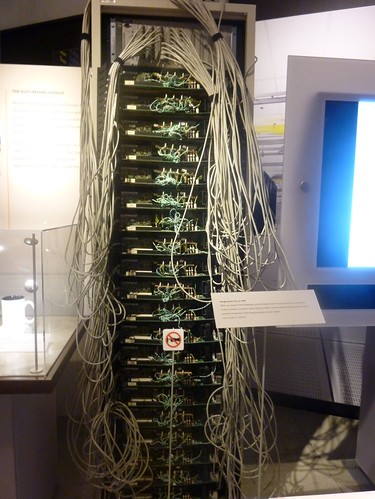
This is one of the original Google server racks. At one point, if you typed a query into the Google homepage, this is where the magic happened. If you have any familiarity at all with how servers usually look, you might be scratching your heading and thinking that this one does not look entirely right. Let me help you with that:
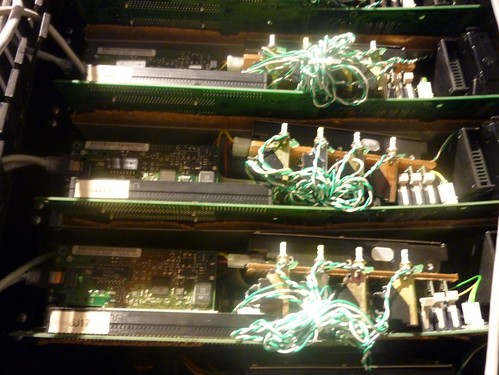
Yes, you can see all of the components. No, that is not normal. Yes, each individual server would normally have its own case. No, under normal circumstances sheets of cardboard would not be used as the insulation between motherboard and shelf. Yes, that is an awful lot of servers to fit into a single rack. Yes again, that would require very good air circulation, but you'll have a bloody difficult time finding a case that gives better circulation than no case at all. No, you would not expect a server to bow in the middle like that...
Two things the early Google was known for: providing the best search results; and being very, very frugal when it came to equipment purchasing.
Let's talk about something a bit more fundamental, though. Hard disks, for example. The one in the computer I'm writing this on has a capacity of around 120 GB (depending on how you measure a giga byte, but that's a different story). Wikipedia tells me that is measures around 69.85 mm × 15 mm × 100 mm, so quite small. This is also a hard drive:
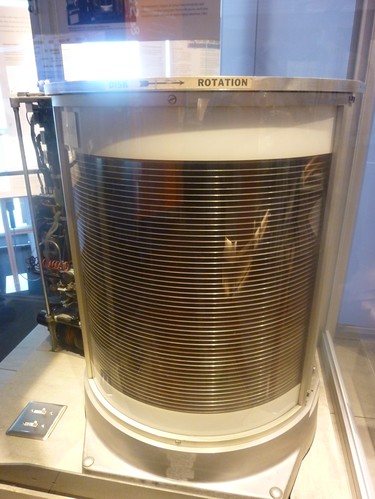
Assuming I haven't gotten mixed up here somewhere, this is the worlds first hard disk, and is made up of 50 24" disks, holding a grand total of 5 million characters. Now, if each of those characters is a one byte ASCII character (or similar) that's approximately 5 MB, or 0.005 GB. Quite the difference in storage density, no?
Here's a (slightly) more recent example of a hard disk, one which I'm told is actually still in use to some extent:
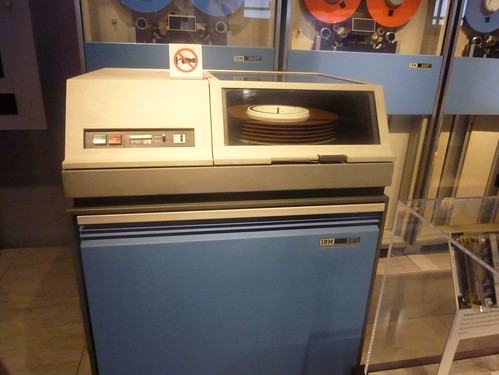
Now, if my understanding is correct, this next piece looks like a hard drive, but is much closer in function to RAM:

What's particularly neat is that it's based on an original design by the regrettably late, extremely great, and utterly brilliant Alan Turing.
The museum has an entire section devoted to the evolution of storage, and it's quite fascinating. Another of the forebears of modern RAM is magnetic core memory, which looks like this:
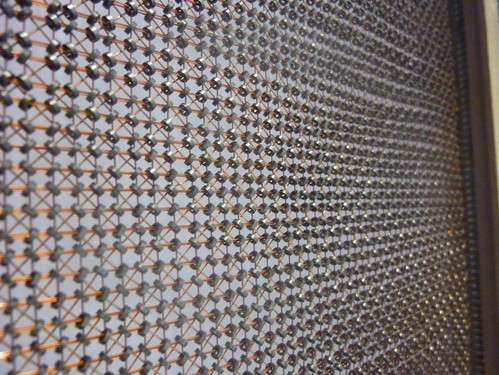
Now that's quite cool, but I'd say that it's also quite pleasing to the eye. I think I'd happily frame that, mount it, and have it hanging from the wall in my flat (somewhere close to the teapot). People walk through castles and talk in hushed tones of all the many things "these stones" have seen. All of the stories they might tell, if they could only speak. But this... unlike your average rock, this is unquestionably memory, and memory which lived through very exciting times in the development of our society. Here's something I look at and wonder what stories it might be able to tell, and what stories it has been forced to forget.
There are many things at the Computer History Museum which are very cool and certainly raise a smile (as well as an appreciative thought as to how far things have come). There are also things which just plain stop you in your tracks; the Difference Engine, for example. Well, at the risk of repeating myself, I'm going to post another picture of it, this time from the other side, so you can see a little bit more of the mechanism:
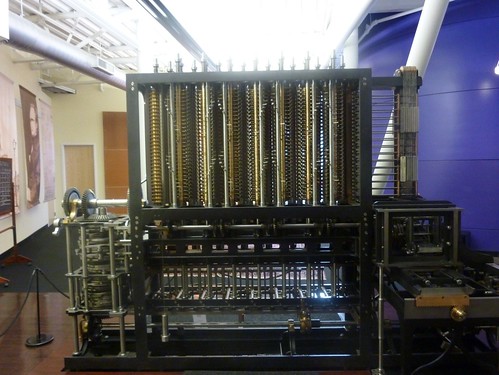
Now there's a thing I would really and truly love to have in my flat. Ideally in a more coffee table friendly size, of course.
Sunday, June 5, 2011
A Different Kind of Tourism
If a person were to walk from downtown Mountain View (in so far as Mountain View has a town to be down of) to the Computer History Museum, and then kept going, they might find themselves wandering into Shoreline Business Park. This is where you would find the silicon in this part of the valley.
Of course, there isn't actually a lot of touristing to do in your average industrial park. We're in Silicon Valley here, though, surely there must be something to see? Well... there are signs for reasonably exciting tech companies, with logos and everything... for example:

Here's a fun one. 23 and Me is either a very cool company, or an utterly terrifying one, depending on your point of view. The basic idea is that you send them some of your spit (and some money). They use this to do some basic DNA profiling and tell you about your genetic predisposition towards certain diseases, your genetic predisposition to certain drugs, and a limited amount regarding your actual genetic ancestry. This all comes wrapped up in a neat web interface which updates as new discoveries are made. I'm generally of the the view that this is pretty cool.
Further in we find even more companies, at least one of which you might have even heard of:
LinkedIn is basically a professional version Facebook. Sort of a fancy online business card holder, networking centre, recruitment system and industry conference all rolled into one. As such, it allows you to show your respectable side to your business contacts, whilst still being able to display that photo set proving that you can get your entire fist in your mouth to your friends. It can be quite useful, but more on that in a moment. I had no idea who the other companies on the sign are, and have not, as yet, felt too much of a need to enlighten myself.
There is, of course, another tech company with a fairly large presence in this business park, but I can't for the life of me remember their name. Oh, wait, yes. I remember:
When in doubt, follow the street signs. While I'm sure it is helpful to have signs pointing to stuff (other examples in this estate include "movies" and "amphitheatre") hanging above the road, making them indistinguishable from street signs is bloody confusing, in my opinion.
Google is, of course, the whole reason I'm in this town, and in fact in this country for these two weeks. For the record, I was recruited via LinkedIn, so it definitely does have it's uses. One of the reasons for this wander was to get a general idea of the lay of the land surrounding the Googleplex. My overall opinion: it's big. Luckily, the Google bikes were very much in evidence:
Often being found looking slightly forlorn in the strangest places. I'm fairly sure the local teens play a bit of cat and mouse with security guards and joyride around the park on them at weekends. This one was close to one of the volleyball courts:

There actually is a reasonable amount to see, wandering around the campus. Google really does live up to a lot of its hype. One of the more famous landmarks of the campus was actually bloody difficult to find, though. It took a serious amount of detective work, comparing photos from the web to views from Google Maps, but I finally tracked down the "Android Lawn":
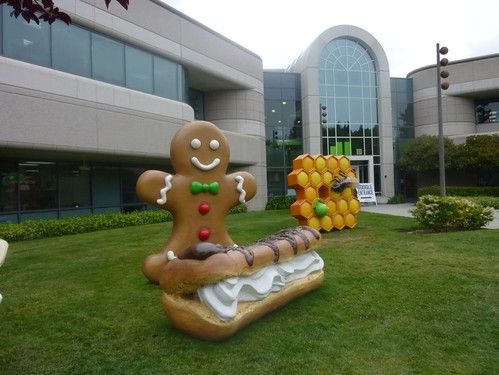
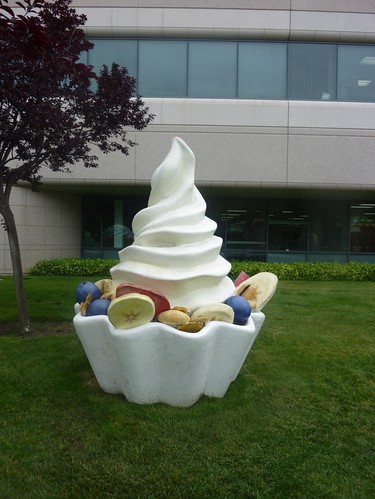
As it turned out, if I'd just stood up and looked over my right shoulder from the place I was performing all of this furious Googling, I probably would have just spotted the damn thing. Such is life. Strangely enough, I was feeling a little hungry at this point, so I headed home.
Finally, it is important to note that while all of this touristing around is fun, and Google is a fuzzy and well meaning company, you should never forget that these are serious guys, doing a serious job. One most always strive to live up to the standard set by those who come before you, and always act in a professional and responsible manner when surrounded by such a high caliber of people.
Seriousness. Responsibility. Decorum.
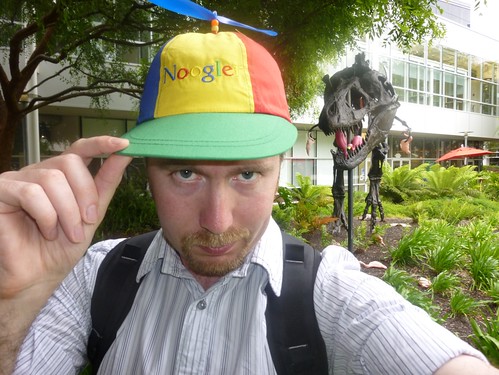
That is all.
Of course, there isn't actually a lot of touristing to do in your average industrial park. We're in Silicon Valley here, though, surely there must be something to see? Well... there are signs for reasonably exciting tech companies, with logos and everything... for example:
Here's a fun one. 23 and Me is either a very cool company, or an utterly terrifying one, depending on your point of view. The basic idea is that you send them some of your spit (and some money). They use this to do some basic DNA profiling and tell you about your genetic predisposition towards certain diseases, your genetic predisposition to certain drugs, and a limited amount regarding your actual genetic ancestry. This all comes wrapped up in a neat web interface which updates as new discoveries are made. I'm generally of the the view that this is pretty cool.
Further in we find even more companies, at least one of which you might have even heard of:
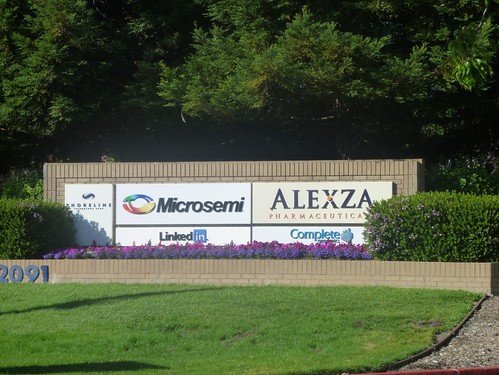
LinkedIn is basically a professional version Facebook. Sort of a fancy online business card holder, networking centre, recruitment system and industry conference all rolled into one. As such, it allows you to show your respectable side to your business contacts, whilst still being able to display that photo set proving that you can get your entire fist in your mouth to your friends. It can be quite useful, but more on that in a moment. I had no idea who the other companies on the sign are, and have not, as yet, felt too much of a need to enlighten myself.
There is, of course, another tech company with a fairly large presence in this business park, but I can't for the life of me remember their name. Oh, wait, yes. I remember:
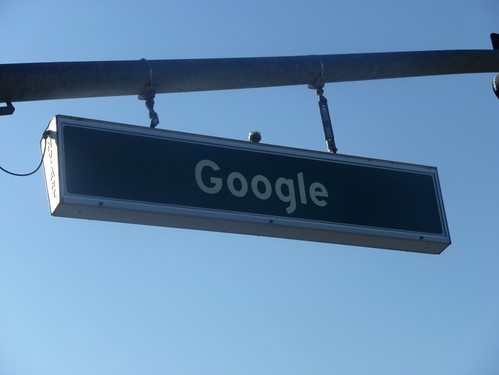
When in doubt, follow the street signs. While I'm sure it is helpful to have signs pointing to stuff (other examples in this estate include "movies" and "amphitheatre") hanging above the road, making them indistinguishable from street signs is bloody confusing, in my opinion.
Google is, of course, the whole reason I'm in this town, and in fact in this country for these two weeks. For the record, I was recruited via LinkedIn, so it definitely does have it's uses. One of the reasons for this wander was to get a general idea of the lay of the land surrounding the Googleplex. My overall opinion: it's big. Luckily, the Google bikes were very much in evidence:

Often being found looking slightly forlorn in the strangest places. I'm fairly sure the local teens play a bit of cat and mouse with security guards and joyride around the park on them at weekends. This one was close to one of the volleyball courts:
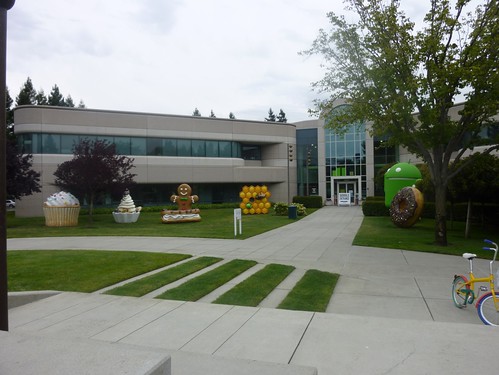
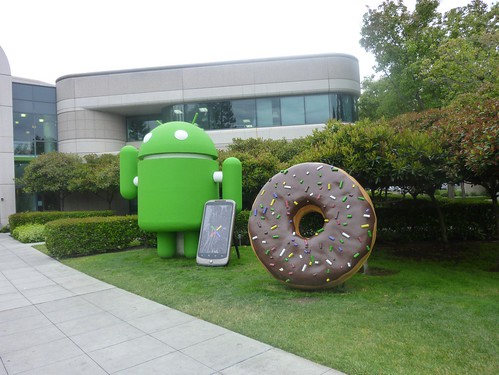
There actually is a reasonable amount to see, wandering around the campus. Google really does live up to a lot of its hype. One of the more famous landmarks of the campus was actually bloody difficult to find, though. It took a serious amount of detective work, comparing photos from the web to views from Google Maps, but I finally tracked down the "Android Lawn":
As it turned out, if I'd just stood up and looked over my right shoulder from the place I was performing all of this furious Googling, I probably would have just spotted the damn thing. Such is life. Strangely enough, I was feeling a little hungry at this point, so I headed home.
Finally, it is important to note that while all of this touristing around is fun, and Google is a fuzzy and well meaning company, you should never forget that these are serious guys, doing a serious job. One most always strive to live up to the standard set by those who come before you, and always act in a professional and responsible manner when surrounded by such a high caliber of people.
Seriousness. Responsibility. Decorum.
That is all.
Saturday, June 4, 2011
X-Men First Class <= 15 Words
A decent story, but lacks coherence and subtlety, plus is kind of a B movie.
Friday, June 3, 2011
The Process and the Platform
The effort required to actually publish that last post was... considerable. Several factors contributed to this:
In the end, I wrote the text of the post in Evernote on my iPad (using an external keyboard), since I'm supposed to install an absolute minimum of third party software on the laptop. Next, I did a copy paste into BlogPress, a blogging app which lets you insert images inline. In theory the official WordPress app also does this, except that the upload always fails for me. As you may have gathered, I inserted the images here. This also rescales them, so you don't need to upload all 12 megapixels. Next, I uploaded it to my actual blog as a draft, and used the web interface to fix any formatting errors and add any extra formatting, since BlogPress doesn't allow bold or italic text (that I've found). That done, I hit the publish button, and: presto!
Needless to say, this is not an ideal workflow. I like using Evernote for writing the actual text (on both iPad and Mac) because it has about the right amount of functionality and it backs everything up and synchronises it between all of my devices. I like having that always available record which I can look back over and search as I see fit. I also like being able to drop one device, pick up another and keep working on the same document more or less seamlessly.
Digression: I also like that I can use it as a permanent record of my notes. Before I moved down to London I was part way through scanning my notebooks from my PhD into Evernote. Evernote runs OCR on the images, finds the text (when my handwriting makes this feasible) and make it searchable. Brilliant. It's like being able to carry all of my old note books around with me, all of the time.
What Evernote doesn't allow you to do is freely mix text and images, however. The WordPress interface does (obviously), but that leaves me with the problem of uploading the images. This is where the low bandwidth and lack of iPhoto were became problems. I suspect the cleanest workflow would be to immediately upload an album to Flickr (or other photo sharing site) and then use the appropriate URL to include the image in the blog post. Searching through the iPhoto library manually sure as hell isn't ideal, and that's the only real option for doing it image by image in the web interface.
The most pleasant experience I've had for putting together blog posts with both text and pictures was actually iWeb, and by a metric mile. iWeb uses the built in OSX controls and lets you select images according to meta-data and what they look like, rather than their file name, as though you were working with a file system specifically designed for serving you images. The iPad does more or less the same thing, in fact, so that part wasn't actually too bad. Using iWeb leaves you with very limited options for your blog, however. It's made me think I should look at using a dedicated program, such as MarsEdit, for writing my posts, or at least for the final stages.
Ideally, I need to find a decent workflow, which doesn't break down when I'm away from home and likely to actually have semi interesting things to blog about, but doesn't restrict me when I am at home. Ideally, it should allow me to jump between different machines with a minimum of effort, and not require me to always add the final touches from the same machine. The workflow should also not break down when no internet connection is available. Text is fairly easy. Images make things more difficult, especially if the images were recorded using my own camera.
Lastly, I'm giving some consideration to porting this blog over to Blogger (only if I can transfer all of my posts and comments, however). It's not a coincidence that I now work for the company responsible for Blogger's infrastructure. Becoming more familiar with that platform can only really be a good thing for me here. Blogger also gives me a couple of options which WordPress doesn't, though. Thoughts?
- I have slow internet access at my hotel;
- Currently, my only (full) computer is my work laptop;
- This doesn't have iPhoto installed (this is mostly for reasons of simplicity, I'd probably get it if I asked).
In the end, I wrote the text of the post in Evernote on my iPad (using an external keyboard), since I'm supposed to install an absolute minimum of third party software on the laptop. Next, I did a copy paste into BlogPress, a blogging app which lets you insert images inline. In theory the official WordPress app also does this, except that the upload always fails for me. As you may have gathered, I inserted the images here. This also rescales them, so you don't need to upload all 12 megapixels. Next, I uploaded it to my actual blog as a draft, and used the web interface to fix any formatting errors and add any extra formatting, since BlogPress doesn't allow bold or italic text (that I've found). That done, I hit the publish button, and: presto!
Needless to say, this is not an ideal workflow. I like using Evernote for writing the actual text (on both iPad and Mac) because it has about the right amount of functionality and it backs everything up and synchronises it between all of my devices. I like having that always available record which I can look back over and search as I see fit. I also like being able to drop one device, pick up another and keep working on the same document more or less seamlessly.
Digression: I also like that I can use it as a permanent record of my notes. Before I moved down to London I was part way through scanning my notebooks from my PhD into Evernote. Evernote runs OCR on the images, finds the text (when my handwriting makes this feasible) and make it searchable. Brilliant. It's like being able to carry all of my old note books around with me, all of the time.
What Evernote doesn't allow you to do is freely mix text and images, however. The WordPress interface does (obviously), but that leaves me with the problem of uploading the images. This is where the low bandwidth and lack of iPhoto were became problems. I suspect the cleanest workflow would be to immediately upload an album to Flickr (or other photo sharing site) and then use the appropriate URL to include the image in the blog post. Searching through the iPhoto library manually sure as hell isn't ideal, and that's the only real option for doing it image by image in the web interface.
The most pleasant experience I've had for putting together blog posts with both text and pictures was actually iWeb, and by a metric mile. iWeb uses the built in OSX controls and lets you select images according to meta-data and what they look like, rather than their file name, as though you were working with a file system specifically designed for serving you images. The iPad does more or less the same thing, in fact, so that part wasn't actually too bad. Using iWeb leaves you with very limited options for your blog, however. It's made me think I should look at using a dedicated program, such as MarsEdit, for writing my posts, or at least for the final stages.
Ideally, I need to find a decent workflow, which doesn't break down when I'm away from home and likely to actually have semi interesting things to blog about, but doesn't restrict me when I am at home. Ideally, it should allow me to jump between different machines with a minimum of effort, and not require me to always add the final touches from the same machine. The workflow should also not break down when no internet connection is available. Text is fairly easy. Images make things more difficult, especially if the images were recorded using my own camera.
Lastly, I'm giving some consideration to porting this blog over to Blogger (only if I can transfer all of my posts and comments, however). It's not a coincidence that I now work for the company responsible for Blogger's infrastructure. Becoming more familiar with that platform can only really be a good thing for me here. Blogger also gives me a couple of options which WordPress doesn't, though. Thoughts?
Subscribe to:
Posts (Atom)